BibleSlides and Logos Bible Software — study deep, teach clearly
Logos is your study library. BibleSlides is your teaching deck. How pastors use Logos for exegesis and BibleSlides for verse slides, annotations, maps, and stage delivery — without replacing either tool.
Pastors often ask whether BibleSlides “replaces Logos.” It doesn’t — and it shouldn’t. Logos Bible Software is a research library: commentaries, original-language tools, guides, and the deep study stack you use midweek. BibleSlides is teaching presentation software: verse-by-verse slides, timed annotations, 3D maps, and a tablet-ready deck the sanctuary can see.
They solve different problems in the same sermon week.
Logos helps you understand the text. BibleSlides helps the room see the text while you teach it.
What Logos is for
Logos (Faithlife) is built for Bible study and sermon research:
- Commentaries, original languages, and resource libraries
- Passage guides, word studies, and cross-references while you write
- Personal notes and highlighting in your study environment
That work is essential. It is also mostly private — on your desk, not on the sanctuary screen.
What BibleSlides is for
BibleSlides is built for the teaching moment after study:
- Native Bible Verse slides with translations via API.Bible
- Stepped annotations timed to the point you’re making
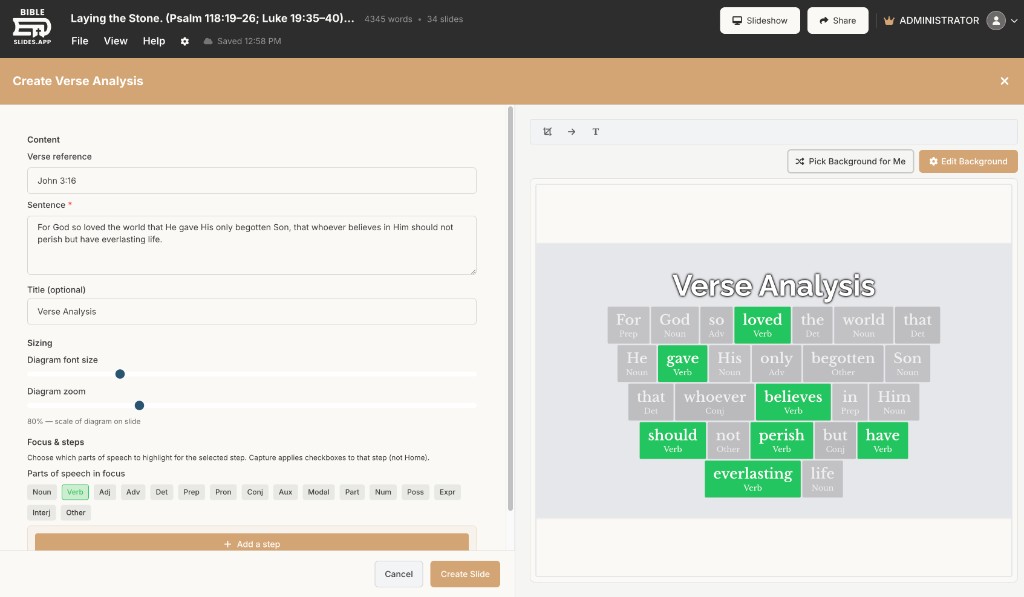
- Verse Analysis and Definition slides when grammar or a lemma carries the sermon
- 3D Bible maps, site models, and BiblePlaces photos when geography or archaeology matters
- Notes interleaved with slides, tablet presenter, practice mode, and Campus QR follow-along
How they complement each other (a real weekly stack)
| Day | Logos | BibleSlides |
|---|---|---|
| Tue–Thu | Exegesis, commentaries, lemma work | — |
| Fri | Finalize outline insights | Teaching starter / insert verse slides from the passage |
| Sat | Quick resource check | Annotation steps, maps, practice mode |
| Sunday | Closed (or open for a last lookup) | Present from tablet; congregation sees the deck |
Practical handoff many teachers use:
- Finish your study and manuscript notes in Logos (or export key insights)
- Open BibleSlides and build the public teaching surface — the slides the room needs
- Put one-line advance cues under each slide in the same document as your preaching notes
- Leave Logos on the desk; take the tablet with BibleSlides on stage
You are not copying a Logos layout into PowerPoint. You’re choosing which insights deserve a sanctuary visual, then building those as first-class slides.
What not to expect from each tool
| Expectation | Better tool |
|---|---|
| Full commentary library & academic resources | Logos |
| Verse-by-verse reveal with stepped markup on the projector | BibleSlides |
| 3D journey maps and BiblePlaces photos in the deck | BibleSlides |
| Multi-resource research workspace | Logos |
| Church publishing hub / Campus audience QR follow-along | BibleSlides |
BibleSlides includes teaching-oriented Greek/Hebrew definition and Verse Analysis slides — enough to put a lemma or structure on screen. That is not a substitute for a Logos library when you’re doing serious study.
FAQ
Do I need Logos to use BibleSlides?
No. Many pastors study with print, other apps, or Logos. BibleSlides starts from a passage reference either way.
Can BibleSlides import my Logos sermon?
Treat Logos as the study source. Build teaching slides in BibleSlides from the passage and the points you’ll actually show the room.
Is Proclaim the same conversation?
Proclaim is Faithlife’s church presentation product and integrates with Logos for worship/production workflows. BibleSlides is teaching-first; many churches keep ProPresenter or Proclaim for lyrics and use BibleSlides for the sermon block. See BibleSlides and ProPresenter.
Related guides
See BibleSlides features
Notes and slides in one document, Bible Verse slides, stepped markup, Verse Analysis, 3D maps, BiblePlaces photos, and tablet presenter apps — built for pastors who teach Scripture.