Pastor teaching tools that stay in the sermon — verse analysis & definitions
Pastor teaching tools shouldn’t live in a second app. Use Verse Analysis and Greek/Hebrew definition slides inside BibleSlides so word study, parts of speech, and lexicon callouts advance with the sermon.
When pastors talk about “teaching tools,” they usually mean the stack beside the sermon: a lexicon tab, a grammar workbook, a highlighter PDF, and a slide deck that never quite matches the study notes. The insight is solid. The handoff to Sunday is where it dies.
BibleSlides puts pastor teaching tools inside the same document you’ll preach from — so word-level analysis and definition callouts are slides you advance, not screenshots you forgot to paste.
A teaching tool only helps the congregation if it can appear on the sanctuary screen at the exact moment you need it.
The problem: study apps don’t present
Typical midweek workflow:
- Look up a Greek or Hebrew lemma in a lexicon site
- Sketch a sentence diagram or color parts of speech in another tool
- Rebuild a simplified version as a PowerPoint slide
- Lose the nuance (or the formatting) when the font changes
By Sunday you’ve taught yourself carefully and the room gets a vague bullet list.
Verse Analysis slides — word-by-word on stage
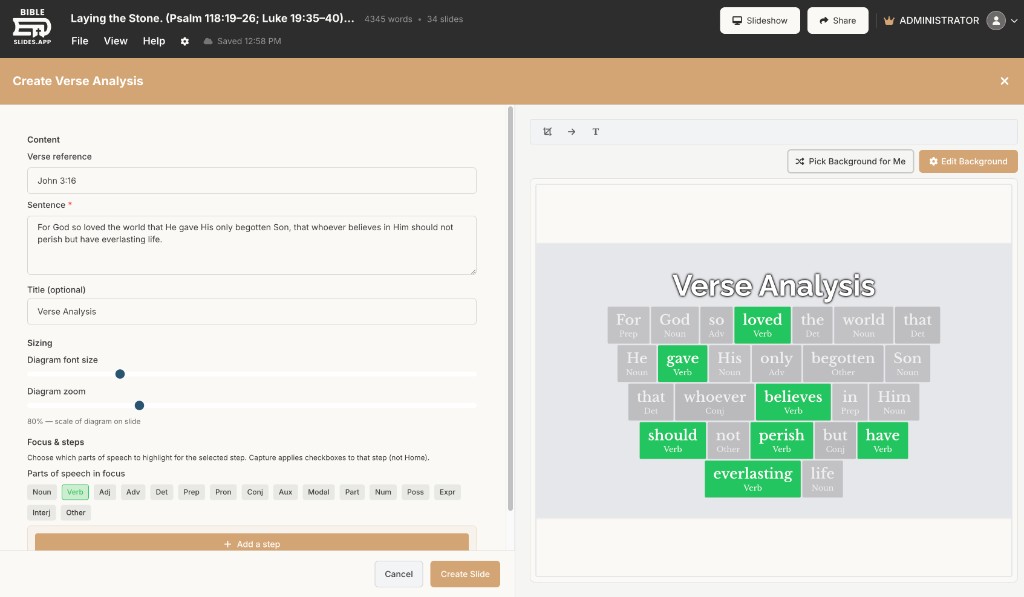
Verse Analysis is a slide type built for close reading: color-coded, word-by-word / parts-of-speech style analysis you can step through while teaching. Cross-references and original-language insight stay attached to the passage you’re already in — not buried in a browser tab behind the projector.
What that solves for pastors:
- You prepare the analysis once while studying
- You advance revelation steps in teaching order (the same step-chip pattern as other BibleSlides types)
- The congregation sees structure — subject, verb, modifiers — not only a block quote
Definition slides — English, Greek, and Hebrew
When a single word carries the point, use a Definition slide. English dictionary-style definitions work for accessible teaching. Greek and Hebrew definitions pull Strong’s-linked, Abbott-Smith / Dodson-style lexicon data so you can put the lemma and gloss on screen without leaving the sermon document.
From a Bible Verse slide you can also add original-language Ω callout steps on the passage itself when you only need a brief lexical beat, not a full definition slide.
Practical pattern many teachers use:
| Moment in the sermon | Tool in BibleSlides |
|---|---|
| Read the English text | Bible Verse slide + dim/focus |
| Show why a phrase matters | Annotation highlight / label step |
| Show grammar / word relationships | Verse Analysis slide |
| Park on one lemma | Definition slide (EN / GR / HE) |
Teaching tools that stay synced with notes
Because notes and slides share one document, your cue to advance the analysis slide sits next to the paragraph where you planned the point. Reorder the illustration and the teaching visual moves with it — the same “one source of truth” model as notes + slides sermon prep.
Who these pastor teaching tools are for
- Expository preachers who regularly pause on grammar or a key Greek/Hebrew term
- Seminary-trained teachers who want the room to see structure without a chalkboard scramble
- Campus or midweek teachers who need analysis slides reusable across a series
They are not a replacement for deep study software. They are the bridge from study to sanctuary.
How to add them this week
- Open next Sunday’s project in Projects
- Insert a Verse Analysis slide for the key verse of the message
- Where one word carries the point, add a Definition slide (pick English, Greek, or Hebrew)
- Put a one-line note under each slide: the sentence you’ll say when you advance
Related guides
See BibleSlides features
Notes and slides in one document, Bible Verse slides, stepped markup, Verse Analysis, 3D maps, BiblePlaces photos, and tablet presenter apps — built for pastors who teach Scripture.