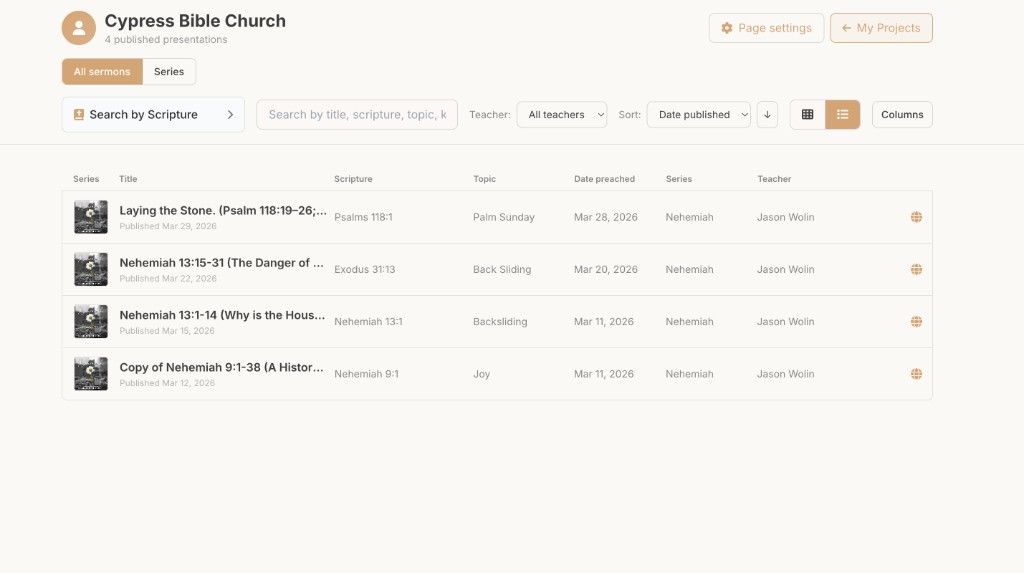
Church sermon publishing software — one hub, every teacher
Stop rebuilding sermon pages by hand. BibleSlides church publishing turns finished teaching decks into a searchable church hub — one URL, series filters, and multi-teacher pages without a separate CMS workflow.
Most churches publish sermons in a second system: finish the deck, export a video, paste a title into the website CMS, upload a PDF outline, hope the series page still matches. When three teachers share a pulpit, formats drift and midweek small groups can’t find last Sunday’s notes.
BibleSlides church publishing is sermon publishing software tied to the deck you already built — publish from the teaching document into a church hub with one URL for your congregation.
The publish step should not be a second creative project. It should be the same sermon, made findable.
The problem church websites create for teachers
Typical handoff after Sunday:
- Media exports video from the livestream tool
- Someone retypes the sermon title and passage into WordPress / Squarespace / Church Center
- Outline PDF may or may not match the slides that were shown
- Guest teachers leave a different folder structure every month
Search engines and your own members both lose: there’s no consistent “where we keep teaching.”
One church hub from BibleSlides
Publish sermons to a church publishing hub — one URL, search and series filters, multiple teachers. The teaching deck isn’t orphaned in a Dropbox folder; it becomes the source for what the congregation can browse later.
What churches get:
- A single place members learn to look for teaching
- Consistent presentation across pastors and campus teachers
- Less “can you resend last week’s slides?” traffic to the office
Campus plan: seats, shared library, native embeds
For multi-staff churches, the Campus plan adds the platform pieces websites usually fake with iframes:
| Need | Campus capability |
|---|---|
| Multiple teachers | Up to 30 same-domain seats |
| Shared teaching assets | Campus Slides library |
| Brand-aligned watch page | Native embeds / web components (Watch, transcript, discussion) |
| Ops | Admin dashboard + campus watermark options |
| Service planning | Planning Center connection — attach decks to plans and publish with watch/notes/discussion |
Small groups benefit from the same publish: notes, transcripts, and discussion questions can sit beside Watch on the published sermon page — no orphaned midweek PDF workflow.
How this differs from “upload the MP3”
| Approach | What members get | What teachers maintain |
|---|---|---|
| CMS page + video link | Watch only | Title, tags, PDF, series page — by hand |
| Generic podcast host | Audio | Separate show notes |
| BibleSlides church publishing | Hub + series + teacher pages from the deck | Publish from the project you already finished |
Who should use BibleSlides for sermon publishing
- Churches that want one branded teaching URL instead of a pile of blog posts
- Multi-teacher teams tired of every pastor formatting pages differently
- Campuses that already use Planning Center and want the teaching deck attached to the plan
Individual pastors can still keep private drafts; publishing is the intentional step when a message is ready for the congregation.
Publish path (high level)
- Finish the sermon in BibleSlides (notes + verse slides + any maps/photos)
- Present Sunday from tablet or booth — same cloud project
- Publish to your church hub when the message is ready for members
- Point your website’s “Sermons” link at that hub URL (or embed Campus Watch components)
For the stage side of the same stack, see tablet presenter and church media laptop setup.
Related guides
See BibleSlides features
Notes and slides in one document, Bible Verse slides, stepped markup, Verse Analysis, 3D maps, BiblePlaces photos, and tablet presenter apps — built for pastors who teach Scripture.