Connect ProPresenter to BibleSlides with a booth URL Web fill
Paste your Campus booth URL into ProPresenter’s Web fill so the house screen shows this week’s BibleSlides teaching deck — no login on the booth machine.
Worship stays in ProPresenter. Teaching stays in BibleSlides. On Sundays when AV already owns the house output, you do not rebuild the sermon as lyric text slides — you drop the live teaching deck into ProPresenter as a Web fill.
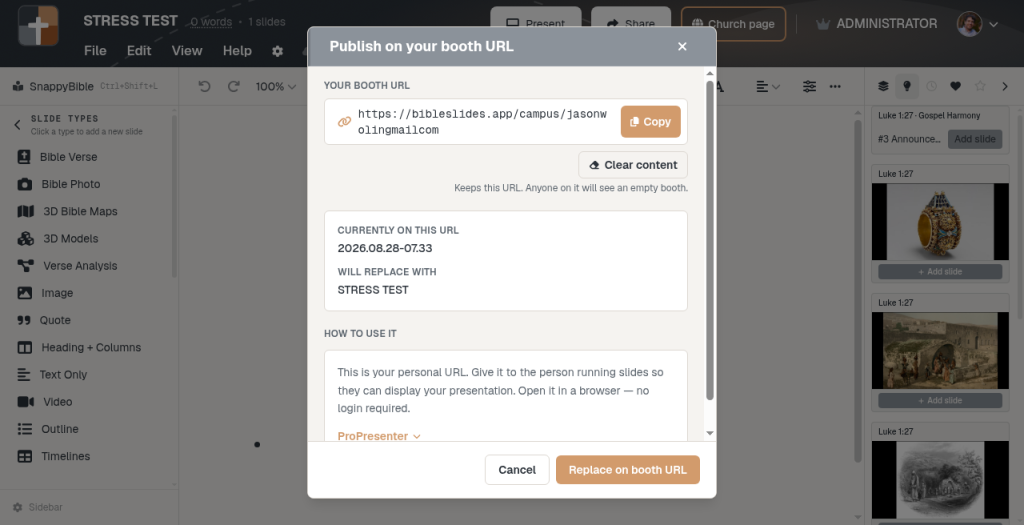
Your Campus booth URL is the page that fill loads. Publish this week’s project onto that permanent link once. Paste the same URL into ProPresenter. No BibleSlides login on the booth PC.
Keep ProPresenter for the service. Point one Web-fill shape at your booth URL for the sermon.
Watch the walkthrough
The video above shows the full path: publish on your booth URL, then wire ProPresenter’s Shape Fill → Web to that link so the sanctuary sees Scripture on schedule.
What you need
| Piece | Role |
|---|---|
| BibleSlides Campus | Personal booth URL (bibleslides.app/campus/{your-slug}) |
| This week’s deck | Published onto that URL from Projects or Present |
| ProPresenter | Slide with Shape Fill Type set to Web |
Older bookmarks that use /pp/{slug} still work — same booth slot.
This is the booth handoff described in When AV runs the house screen, not a replacement for tablet Present when you advance from the platform yourself.
1. Publish this week’s deck on your booth URL
- Finish the teaching project in BibleSlides
- Open Publish on your booth URL from the project ⋮ menu or Present
- Copy Your booth URL (give it to AV once if they do not already have it)
- Choose Publish on booth URL / Replace on booth URL
After that, the Friday habit is publish — not re-send a new link every week. Clearing content empties the slot; the URL stays yours.
2. Add a Web fill in ProPresenter
- Open the Slide Editor on the slide where teaching should appear
- Add a Shape (typically a rectangle) and scale it to cover the slide
- In the inspector, set Shape Fill Type to Web
- Paste the booth URL — ProPresenter renders the live webpage as the fill
Advance still follows your room’s habit: booth keyboard/click on the BibleSlides page, tablet sync if you use it, or whatever cue AV already runs for program changes. ProPresenter’s Web fill cannot send input into the page the way a normal browser can — if operators need to click the teaching deck, open the booth URL in Chrome/Edge fullscreen instead.
Why Web fill beats rebuilding the sermon
| Approach | Result |
|---|---|
| Re-type verses as ProPresenter text cues | Two copies of the outline; annotations and maps do not travel |
| Sign into the BibleSlides editor on the booth PC | Password handoff; wrong account risk |
| Booth URL + Web fill | One permanent link; this week’s cloud deck; no booth login |
That is the same split as BibleSlides and ProPresenter: production owns the show file; BibleSlides owns the teaching document.
Sunday checklist
- Publish today’s deck on the booth URL
- Confirm ProPresenter still has the URL in the Web fill (or the booth browser is bookmarked)
- Run slide 1 once on the house screen before the call to worship
- Preach — replace on the booth URL next week; the URL does not change
Related guides
See BibleSlides features
Notes and slides in one document, Bible Verse slides, stepped markup, Verse Analysis, 3D maps, BiblePlaces photos, and tablet presenter apps — built for pastors who teach Scripture.