
Bible teaching software for churches — one hub for teachers, not a USB chain
Bible teaching software should help every teacher stay in the text: shared cloud decks, verse slides, tablet control, and optional campus publish. How BibleSlides fits church and multi-teacher workflows.
Churches don’t only need “a pastor’s laptop app.” They need Bible teaching software that survives midweek handoffs: senior pastor to campus teacher, Thursday edit to Sunday booth, series week 3 to week 14 without a folder named USE_THIS_ONE.
BibleSlides is built for that church workflow — one cloud teaching document per message, Scripture-first slide types, tablet stage control, and optional organization publishing so finished decks live in a searchable hub.
Teaching software fails when the file system becomes the liturgy. The text should be easier to find than last week’s USB.
What churches ask teaching software to do
- Prep — teachers build verse slides and notes without rebuilding PowerPoint from scratch
- Delivery — booth or tablet advances the same deck the teacher finished
- Continuity — series graphics, translation choice, and outline points don’t drift mid-book
- Access — other teachers (and later, the congregation archive) can find what was taught
Worship lyric software owns songs and production. Planning Center owns the service plan. BibleSlides owns the sermon teaching deck — and can link into that weekend plan (Planning Center workflow).
Product features that serve a church, not only a solo pastor
| Church need | BibleSlides feature |
|---|---|
| Notes stay with slides | One scrolling document — move a section and the verse slide moves with it |
| Scripture on the house screen | Bible Verse slides + stepped markup |
| Grammar / word study on stage | Verse Analysis and Definition slides |
| Platform control | Native tablet apps (iPad, Android, Mac, Windows) |
| Rehearsal without the room | Practice mode |
| Multi-site / hard-of-hearing | Campus QR audience follow-along |
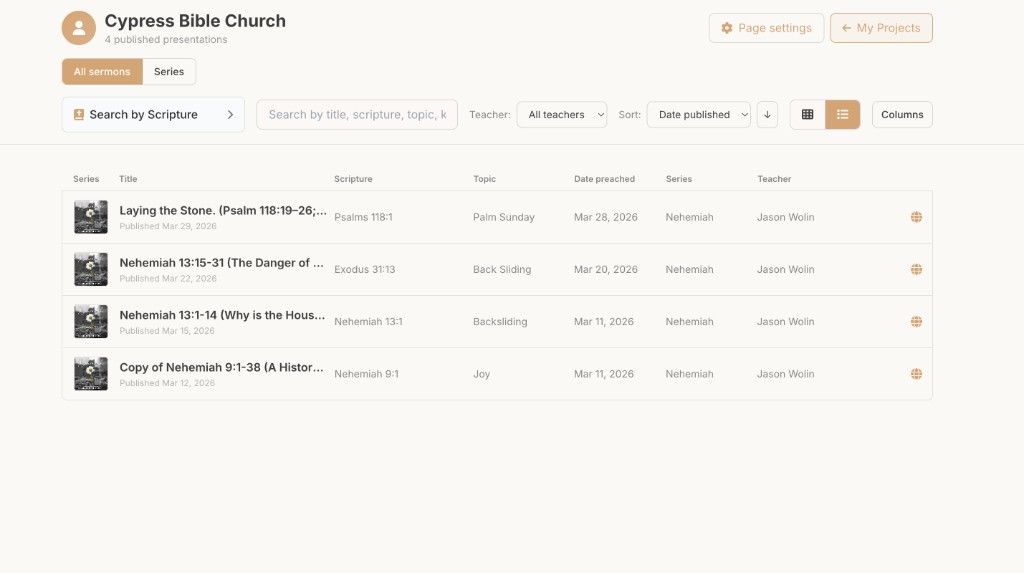
| Public archive of teaching | Church publishing hub — one URL, series filters, multi-teacher pages |
| Real geography | BiblePlaces.com photos and 3D Bible maps in the same project |
Free vs campus: what teams usually need
Individuals can start free and learn the verse-slide workflow. Campus plans unlock organization tools — follow-along QR, publishing, and multi-teacher coordination — when the church is ready for shared teaching infrastructure. See Campus benefits.
A Friday checklist for media + teaching teams
- Confirm Sunday’s project is the cloud file (not an emailed PPT)
- Teacher runs practice mode once for click rhythm
- Media laptop opens the same project; tablet pairs for stage advance
- If Campus follow-along is on, QR lands on the projector with the live slide
- After Sunday, publish to the church hub if that message should stay findable
Related guides
See BibleSlides features
Notes and slides in one document, Bible Verse slides, stepped markup, Verse Analysis, 3D maps, BiblePlaces photos, and tablet presenter apps — built for pastors who teach Scripture.