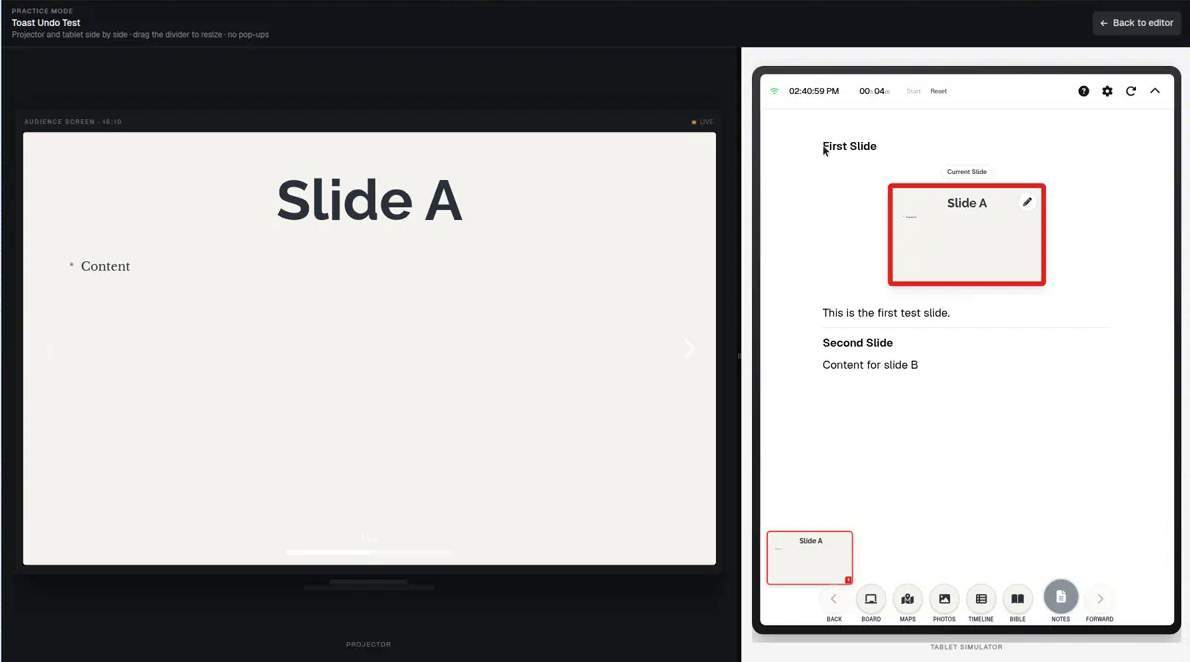
Rehearse a long exposition before the room arrives — practice mode
Expository decks have dozens of verse steps. The first time through should not be Sunday. BibleSlides practice mode puts projector output and tablet notes side by side so you fix click rhythm before people sit down.
Expository sermons are click-heavy by design. A single pericope can mean a Bible Verse slide with ten annotation steps, a Verse Analysis slide, a map fly-to, and a photo of the site. That is a feature when the reveals match your mouth. It is a liability when the first run is live and the booth operator (or you) is a step ahead of the sentence.
Generic slide software treats rehearsal as “flip through Slideshow.” That does not show what you will see on the tablet versus what the sanctuary sees.
BibleSlides practice mode is a split rehearsal: house screen on one side, tablet presenter on the other, same cloud deck.
The congregation should never be the first people to hear your click rhythm.
The pastor’s problem: too many good steps
Faithful exposition tempts you to mark everything you noticed in study. Each mark is defensible. Together they feel twitchy:
- You click before you finish the sentence
- You talk for two minutes with a highlight that already gave away the next point
- Media volunteers learn the deck during the sermon
You cannot diagnose that from a laptop preview of slides alone. You need the presenter surface (notes, step chips, timers) and the clean output at the same time.
What practice mode is for
Open practice from the editor (/practice for that project). You are checking:
- Order — does this annotation fire when you say the phrase?
- Density — did you put five insights on one verse that should have been five steps or one highlight?
- Handoff — verse slide → diagram → verse slide without a black gap or a title slide that breaks the text
- Tablet ergonomics — notes large enough, timers / % left honest for a 35-minute exposition
It is the same idea as a choir run-through: you are not performing yet; you are finding the places the arrangement fights the text.
A Friday checklist for book-study weeks
- Walk the preaching text only — ignore series bumper slides
- Say the sentence, then click (not the reverse)
- Cut any step you cannot narrate in one breath
- Confirm the media laptop will open the same cloud project — no USB from Wednesday
- If Campus QR follow-along is on, glance once that phones will track the live slide
That last item matters for exposition: people who cannot see the screen still need the current verse, not last week’s file. See congregation follow-along.
Practice is not a substitute for study
Practice mode will not fix an outline that is not in the text. It will catch the delivery problems unique to verse-by-verse decks: over-clicking, under-clicking, and notes that no longer match the step list after you reordered Thursday night.
Because notes and slides are one document, a reorder in the editor is what you rehearse. You are not practicing an old export.
How to run it this week
- Finish annotation steps on the Bible Verse slide
- From the editor, start practice mode for that project
- Preach the passage once at the desk — projector pane + tablet pane
- Delete or merge steps that felt like fidgeting
- Sunday: present from the tablet app or booth laptop on the same project
Related guides
See BibleSlides features
Notes and slides in one document, Bible Verse slides, stepped markup, Verse Analysis, 3D maps, BiblePlaces photos, and tablet presenter apps — built for pastors who teach Scripture.