Put chronology on the projector — Timelines for Paul, kings, and the life of Christ
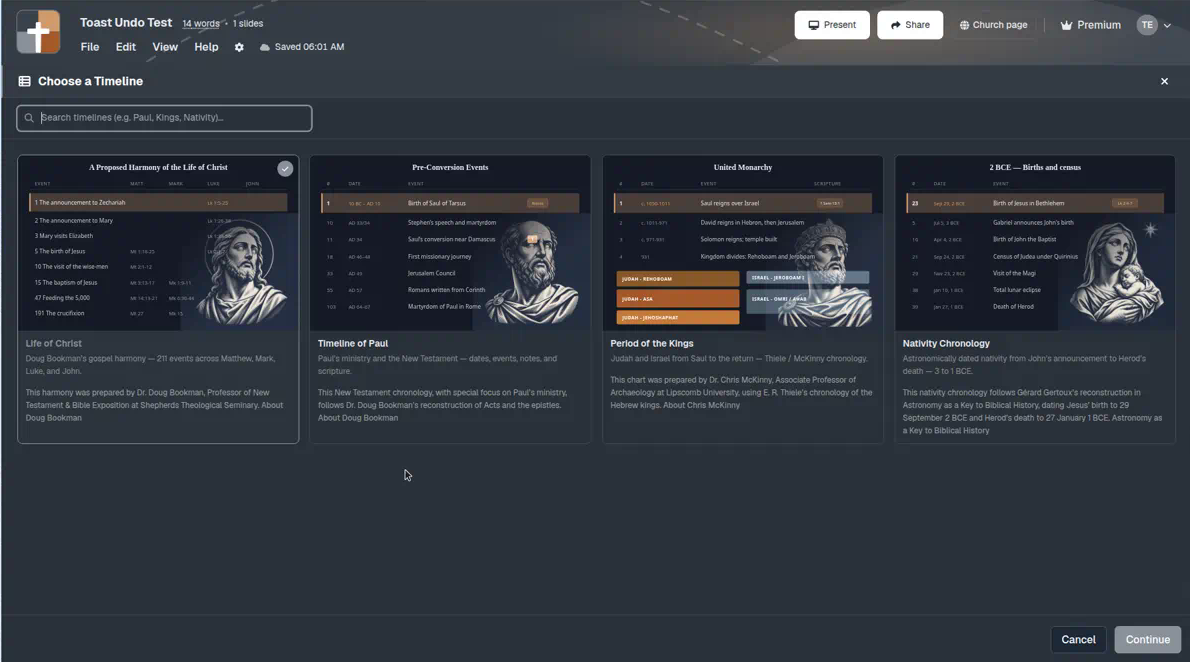
Choose a Timeline in BibleSlides — Life of Christ, Timeline of Paul, Period of the Kings, or Nativity Chronology — then spotlight events as stepped sermon slides so the room sees the when, not only the verse.
Expository Sundays often stall on a simple question: when? Acts is moving; the kings of Judah and Israel overlap; Advent needs a clear order from announcement to Herod. Paper charts help you on Tuesday. They rarely survive as a readable sanctuary slide.
BibleSlides Timelines is the slide type for that teaching beat: pick a chronology chart, spotlight the events you will preach, and advance them in sermon order — so the room sees the sequence while you stay in the text.
A chronology that only lives in your study notes is still private. If the congregation cannot see the line of events, you are asking them to trust a timeline they cannot check.
How this differs from Gospel Harmony (and from On the fly)
You may already know Gospel Harmony slides — putting parallel Gospel references on screen for one event. Timelines uses the same stepped-teaching pattern, but the job is chronology: eras, dates, and event order across a whole chart.
| Need | Use |
|---|---|
| “Matthew adds this line; Mark is silent here” | Gospel Harmony (parallel beat) |
| “Where are we in Paul’s journey / the kings / Advent?” | Timelines (authored slide in the deck) |
| A quick chart glance mid-sermon that was not in the file | On the fly → Timeline |
Same family of tools. Different pastoral moments. Prep Timelines when the when is part of the outline; use On the fly when Q&A pulls you sideways.
The pastor’s problem: “also around then” is not a slide
What usually happens:
- You wave at a paper harmony or a Logos layout — the front row sees nothing useful
- You paste a date list into bullets — no sense of era, journey, or scale
- You screenshot a dense chart — unreadable past row three
None of that matches how you actually teach: “Saul is here. Then Damascus. Then the first journey — and Galatians sits here.”
What Timelines is
In the editor, add a Timelines slide. New slides open Choose a Timeline first. You pick one of four charts (search works: Paul, Kings, Nativity, and so on), then Continue into the step editor.
The modal title stays Timelines. You can Change Timeline later if you started on the wrong chart — switching clears steps so you do not mix datasets by accident.
The four charts
| Timeline | What it is | Credit (shown in the picker) |
|---|---|---|
| Life of Christ | Doug Bookman’s gospel harmony — 211 events across Matthew, Mark, Luke, and John | Dr. Doug Bookman (Shepherds Theological Seminary) |
| Timeline of Paul | Paul’s ministry and the New Testament — dates, events, notes, and scripture | Dr. Doug Bookman |
| Period of the Kings | Judah and Israel from Saul to the return — Thiele / McKinny chronology | Dr. Chris McKinny (Lipscomb), using E. R. Thiele |
| Nativity Chronology | Astronomically dated nativity from John’s announcement to Herod’s death — 3 to 1 BCE | Gérard Gertoux (Astronomy as a Key to Biblical History) |
Author write-ups and links appear under each card so attribution stays with the chart — not as fine print you invent on Sunday.
Filters that match how you preach
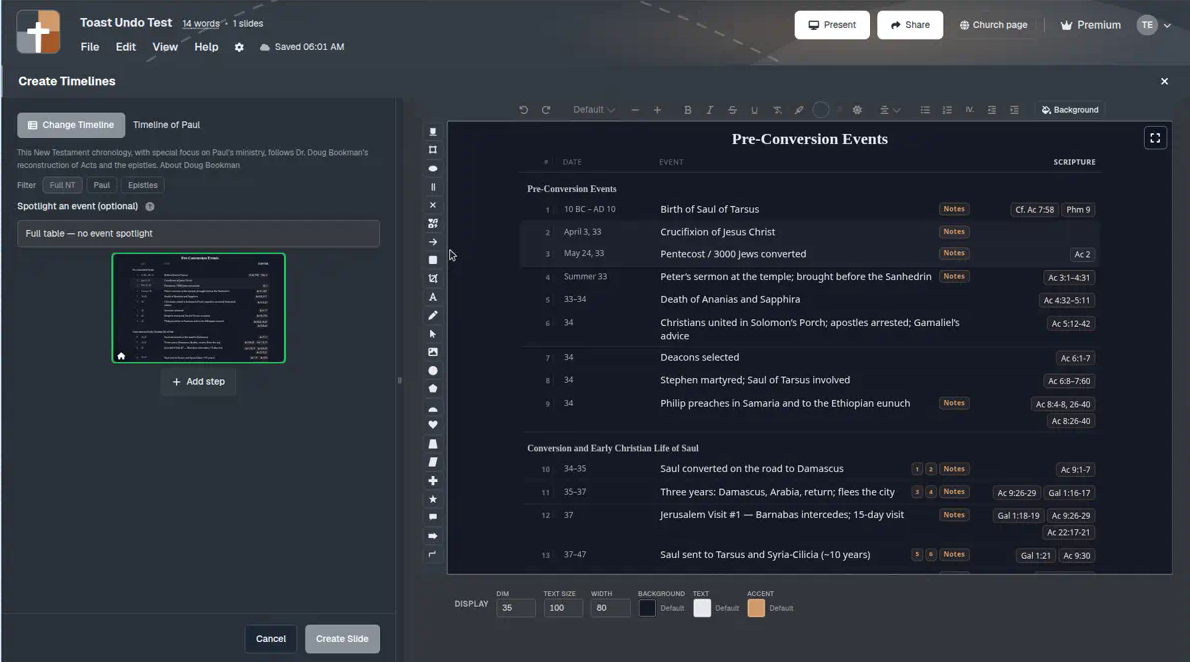
Once a chart is open, filters narrow the table so you are not scrolling past every row:
| Chart | Filter tabs |
|---|---|
| Timeline of Paul | Full NT · Paul · Epistles |
| Period of the Kings | Full · Judah · Israel · ANE |
| Nativity Chronology | Overview · Gospel · Roman · Astronomy · Divisions of Priests · Full |
Period of the Kings also has a Layout choice: Table (default) or Time scale (proportional) when relative span helps the point.
Use filters while you build the slide. The sanctuary should still see a clean, stepped story — not every filter chip.
Spotlight events, then step them
Teaching rhythm matches verse annotations and map journeys:
- Optionally Spotlight an event (search by title or reference)
- Add event steps on the minimap rail in the order you will preach
- Advance step chips from the tablet while you speak
Home can show the undimmed table; later steps focus the event you are explaining. You are not replacing sequential exposition of Acts or 1–2 Kings. You are putting the chronology beat on a slide you can advance, then returning to the verse slide.
For Life of Christ, the same 211-event harmony undergirds both parallel-Gospel teaching and overview chronology — pick the beat the outline actually needs.
A quiet Sunday workflow
- In sermon prep, decide whether the room needs when as much as what the text says
- Add a Timelines slide → Choose a Timeline → pick Paul, Kings, Nativity, or Life of Christ
- Filter if needed; spotlight only the events you will name
- Keep speaker notes under the slide in the same document
- On Sunday, advance timeline steps from the tablet; return to Bible Verse slides for the argument of the text
If a map journey serves better than a date table, prefer 3D Bible map routes. Timelines answers order and era; maps answer place and path.
When not to use Timelines
- The verse on screen already carries the point — leave the chart closed
- You only need one parallel line in another Gospel — use Gospel Harmony
- You need a quick sketch, not a chronology — use Board
BibleSlides remains a quiet servant: Scripture first, chronology when it serves the Word, then out of the way.
Related guides
See BibleSlides features
Notes and slides in one document, Bible Verse slides, stepped markup, Verse Analysis, 3D maps, BiblePlaces photos, and tablet presenter apps — built for pastors who teach Scripture.