BibleSlides · Bible teaching software
Bible teaching software for pastors
Bible slides made easy — pastor teaching software with verse-by-verse sermon slides, 3D Bible maps, and Todd Bolen photos in one document — then present with the tablet app. Write the sermon beside the slides. Built for pastors, churches, and seminaries — not an AI sermon writer, worship lyrics, or PowerPoint templates.
Bible slides made easy.
Build on laptop or desktop. Present with the iPad, Android, Mac, Windows, or Linux tablet app.
What is BibleSlides? · Start creating free · Guides & tutorials · Sermon examples · Bible teacher software guide
BibleSlides at a glance
- 60,000+ Bible photos
- 23+ slide types
- 1,000+ Bible translations via API.Bible (verse text — not a translated product UI)
- iPad, Android, Mac & Windows tablet apps
Pastor teaching software built for Scripture, not lyrics
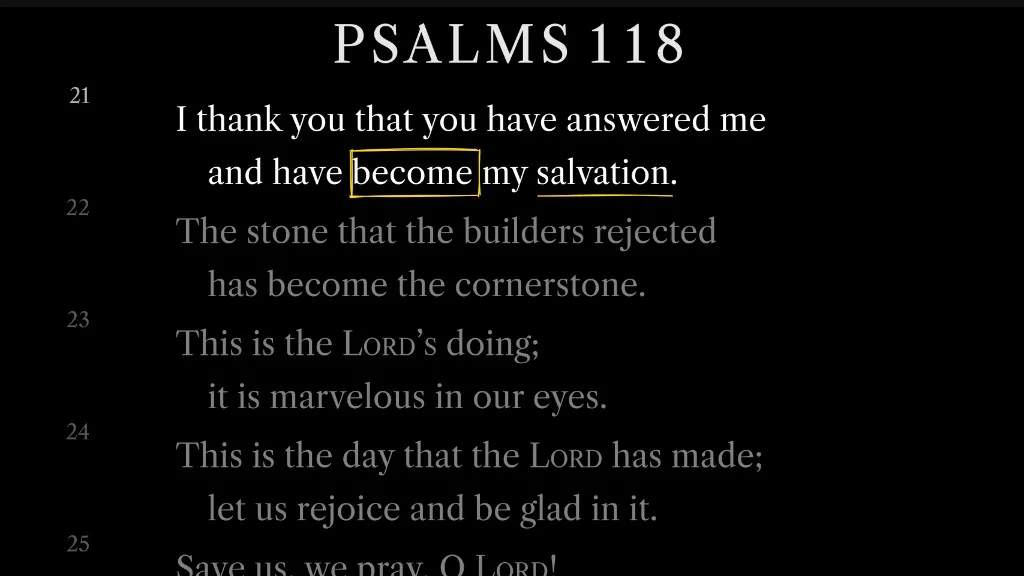
- Bible verse slides — Verse-by-verse sermon slides with multiple Bible translations for teaching and preaching.
- 3D Bible maps — Fly over terrain and trace biblical journeys in interactive 3D maps.
- Integrated sermon notes — Write the sermon next to the sermon slides so the manuscript and the deck stay in sync.
- Bible photo slides — Todd Bolen photos from BiblePlaces.com — biblical sites and archaeology — inserted beside the passage.
- Tablet presenter apps — Native iPad, Android, Mac, and Windows apps for stage control while you present.
- Organization publishing — Publish sermons to a public hub with one URL for your audience.
- Personal slideshow URL — A personal web address for the person running slides — no login required.
Guides for bible teacher software workflows
- Bible teacher software for pastors — verse-by-verse slides and notes in one document — pastor teaching software, not a lyric engine.
- Preaching software for pastors — notes and slides in one document, verse reveals, markup, and tablet stage control for exposition.
- Sermon presentation software for Bible teachers — verse slides and timed annotations instead of title slides and bullet dumps.
- Bible teaching software for churches — cloud decks, tablet control, Campus follow-along, and a multi-teacher publish hub.
- AI sermon software vs Bible teaching slides — write elsewhere; put Scripture on the sanctuary screen here.
- Expository preaching: verse-by-verse slides — keep the sanctuary on the verse you are explaining, with surrounding context dimmed.
- Verse Analysis for expository preaching — color-coded parts of speech on screen instead of alliterated points that miss the grammar.
- Gospel harmony slides — 211 events and stepped parallels without flipping a book on the pulpit.
- Practice mode for long expositions — rehearse projector and tablet click rhythm before the room arrives.
- Book-study Sundays in one document — notes, verse slides, and outline points that still match the text in week 14.
- Church presentation software for Bible teaching — verse slides, timed annotations, tablet control, and Campus QR follow-along.
- 3D Bible maps that teach journeys — pitch, zoom, labels, and fly-to steps instead of flat atlas screenshots.
- Biblical places vs modern map overlays — OpenBible names, modern cities, borders, Roman roads, and empire shading.
- Bible map routes with nodes and arrows — editable paths, direction arrows, focus boxes, and campaign steps.
- Stop toggling Word and PowerPoint for sermon prep — notes and Bible slides in one document so they stay in order.
- Bible slide annotations vs PowerPoint — precise timed reveals instead of clunky markup tools.
- Present Sunday from a tablet — live advance, interleaved notes, and the latest cloud deck.
- Pastor teaching tools: verse analysis & definitions — word-level analysis and lexicon slides inside the sermon document.
- Audience follow-along with a QR code — Campus plans: phones track live Bible slides with no app or sign-in.
- Personal booth URL for the person running slides — One permanent link for AV or ProPresenter — no booth login.
- Church sermon publishing software — one hub URL for every teacher and series.
- Teaching starter: Sunday deck from a passage — opening, verse slides, outline points, and closings in one wizard.
- BibleSlides and Logos — study in Logos; teach with verse slides, maps, and stage delivery.
- Connect ProPresenter to BibleSlides — Booth URL as a ProPresenter Web fill for the teaching deck.
- BibleSlides and ProPresenter — worship production in ProPresenter; sermon teaching in BibleSlides.
- BibleSlides and Planning Center — service plans linked to teaching decks and Church Center publish.
- BibleSlides vs Sermonary — manuscript writing app vs Scripture teaching slides.
- BibleSlides vs Sermonary for Sunday teaching — what the audience sees when notes meet the house screen.
- BiblePlaces.com photos in BibleSlides — 60,000+ Todd Bolen archive images searchable in your sermon.
- Bible places photos for sermons — Capernaum, Galilee, Jerusalem — search the land, not a folder tree.
- Todd Bolen’s bible photos for teaching — Photo Companion depth with sermon-ready insert speed.
- Teach with Bible photos on Sunday — make the land visible; join to build your first deck.
- Bible photos vs stock images for church — why the place has to be real — and how to start free.
- Bible annotation & markup for teaching — stepped highlights and labels timed to the sermon, with presentation best practices.
- Sermon slides on a tablet — tap to advance, draw, timers, % left, and large-type notes while you preach.
- Tablet timers & % left for sermon slides — countdown, count-to-time, and document progress in the presenter header.
- Advance & draw sermon slides from a tablet — step chips, live pens, and Display Settings for arm's-length reading.
Common questions about bible teacher software
- Is BibleSlides bible teaching software?
- Yes. BibleSlides is bible teaching software for pastors — bible slides made easy. Verse slides, annotations, 3D maps, photos, and sermon notes live in one document. It is not a worship lyric engine or a free PowerPoint template library.
- What is pastor teaching software?
- Pastor teaching software is for the sermon, not the song list. BibleSlides puts Scripture on the projector the way you teach it — verse-by-verse, marked up, with notes in the same file — then you present from a tablet while the media laptop opens the same cloud deck.
- How is BibleSlides different from PowerPoint for sermon slides?
- PowerPoint is a general slide tool. BibleSlides is built for Scripture: verse-by-verse reveals, stepped annotations timed to your notes, Bible translations, maps, and tablet stage control so the congregation sees the right words when you teach them.
- Do I need to replace ProPresenter?
- No. Keep ProPresenter (or similar) for worship lyrics and production. Use BibleSlides as your pastor teaching software for the sermon deck — then switch back for worship.
- Is there a free trial for Premium?
- Yes. New accounts include 30 days of Premium (Bible Photos, 3D Maps, 3D Models, and more) with no credit card. After that, the Free plan stays available. Some promotional codes require choosing a paid plan and adding a card — you are not charged during the promo’s free months.
- Does BibleSlides require Planning Center?
- No. Planning Center is optional US church-management tooling. Churches anywhere can prepare and present in BibleSlides without connecting it — including midweek gatherings, not only a weekend service.
- Does BibleSlides include Todd Bolen photos?
- Yes. Premium includes 60,000+ Todd Bolen photos from BiblePlaces.com — biblical sites, artifacts, and archaeological views — searchable by verse or place and inserted as sermon slides. New accounts can try them during 30 days of Premium.
- Is BibleSlides a sermon writer or sermon slides software?
- You write the sermon in the same document as the sermon slides — notes beside verse-by-verse Scripture, or a Word manuscript imported in. BibleSlides is not an AI sermon writer that drafts the message for you.
Bible teaching
software for
pastors
Bible teaching software for pastors — bible slides made easy. Verse-by-verse slides, 3D maps, and tablet apps. Built for Scripture, not lyrics. Free to try.

No credit card required. New accounts include 30 days of Premium; the Free plan stays available after that.
60,000+
Todd Bolen photos
23+
Slide types
1,000+
Bible translations
iPad · Android · Mac · Windows · Linux
Tablet apps
Exclusive partnership
Todd Bolen photos for sermon slides.
Every premium plan includes 60,000+ Todd Bolen photos from BiblePlaces.com — biblical sites, artifacts, and archaeological digs — searchable by verse or place and inserted next to the sermon you write.
Visit BiblePlaces.com
About the photographer
Dr. Todd Bolen
Professor of Biblical Studies at The Master's University and founder of BiblePlaces.com. He taught for years at TMU's Israel Bible Extension near Jerusalem—leading geography field trips and archaeological work—and built the Pictorial Library of Bible Lands and Photo Companion to the Bible so pastors and teachers can show the biblical world with accuracy. PhD, Dallas Theological Seminary.
Overview
What is BibleSlides?
Scripture slides, notes in the same document, and a tablet for Sunday — in one walkthrough.
Pastor teaching software
Built for Bible teaching,
not worship production.
Sermon slides and the sermon you write stay in one document. BibleSlides is not an AI sermon writer — it puts the verse on the screen the way you teach it.
Bible Slides
Verse-by-verse sermon slides with multiple translations.
 Premium
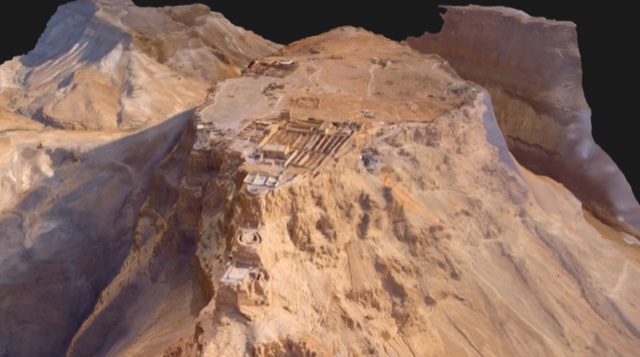
3D Models
Rotate and step through detailed 3D models of biblical sites. Premium — try free for 30 days.
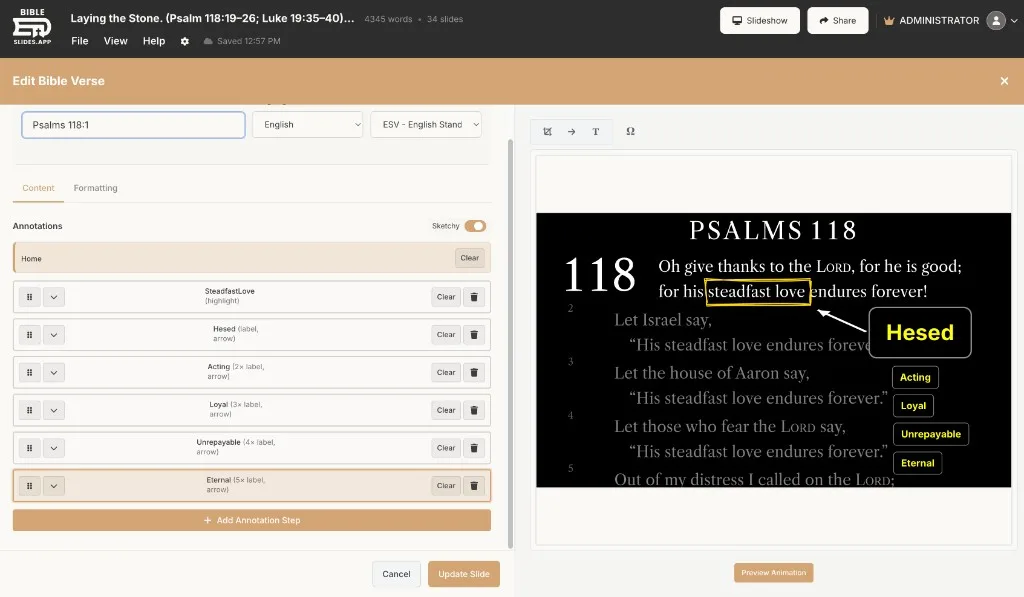
Markup & Annotation
Highlight and annotate key passages without switching apps.

3D Bible Maps
Fly over terrain and trace biblical journeys in 3D. Premium — try free for 30 days.
Verse Analysis
Word-by-word original language tools and cross-references.

Integrated Notes
Write the sermon next to the sermon slides — one document, always in sync.

Bible Photo Slides
60,000+ Todd Bolen photos from BiblePlaces.com, paired with a verse or keyword. Premium — try free for 30 days.
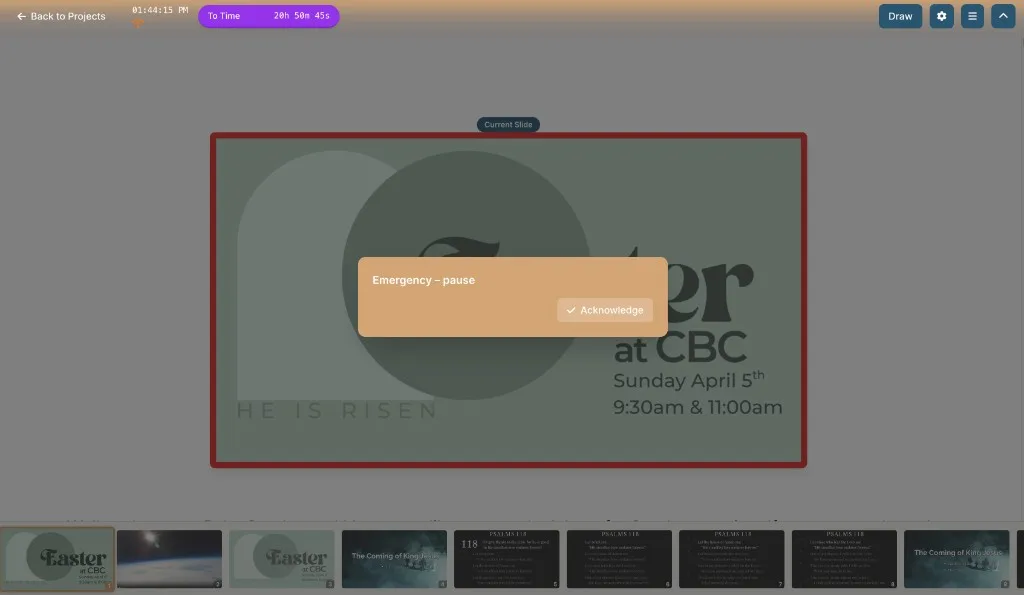
Security Messaging
Tech alerts appear on your tablet — not the main screen.
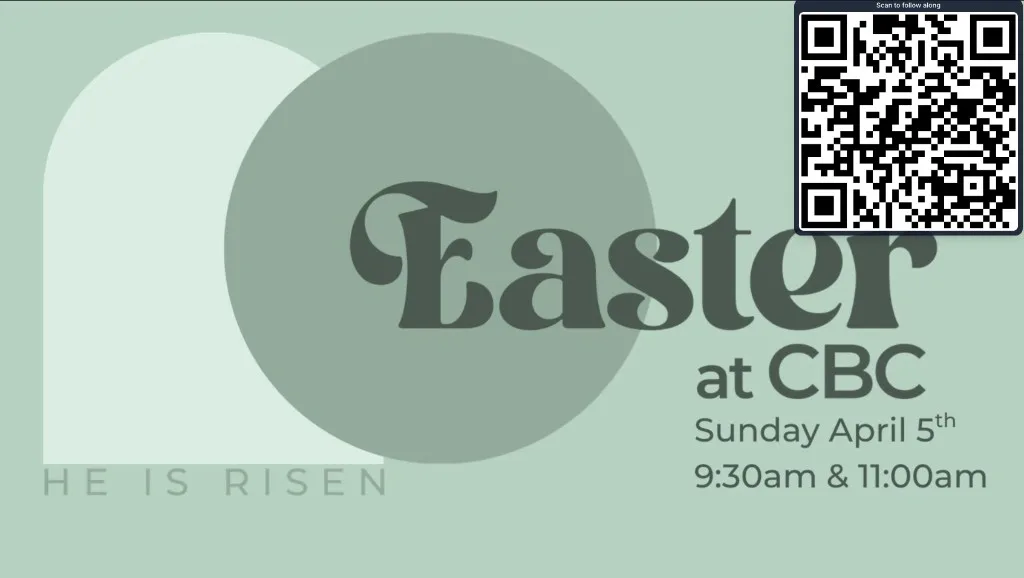
Audience Follow-Along
Campus plans: audience scans a QR on the projector — no app or sign-in.

Booth URL
A personal web address for the person running slides — no login required.

Practice Mode
Rehearse with projector and tablet side by side in one browser tab.

Tablet Presenter
Native iPad, Android, Mac, and Windows apps for stage control, live sync, and On the fly teaching.
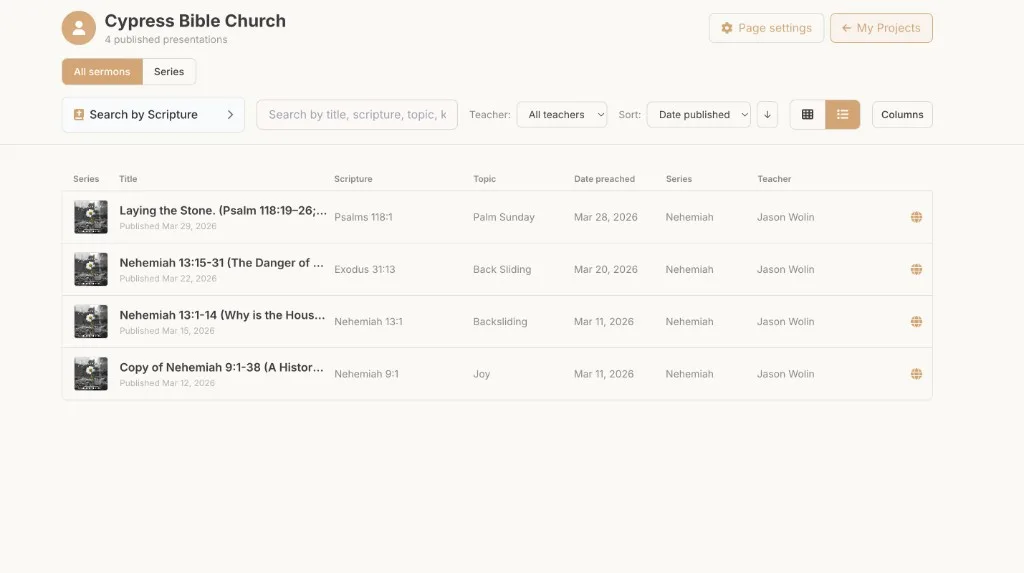
Organization publishing
Publish presentations to a public hub — one URL, every teacher.
Pricing
Simple, transparent pricing
Upgrade or downgrade anytime. Free includes verse slides, charts, outlines, and more — bible photos, 3d maps, 3d models, family trees, and ancient units require premium.
Prices in USD
Free
- New accounts include 30 days of Premium (and audience follow-along). After that, these Free limits apply unless you upgrade.
- Max 7 slides per presentation
- Max 3 presentations
- Slides are watermarked
- Verse slides, charts, outlines, and more — Bible Photos, 3D Maps, 3D Models, Family Trees, and Ancient Units require Premium
- No image upload
- No HTML, PDF, PowerPoint, image, or offline slideshow export
- SnappyBible and on-the-fly tools require Premium
- 3 custom themes
- 2 custom font pairings
- All predefined themes
- Personal slideshow URL for the person running slides (no login)
Premium
- Unlimited slides and presentations
- Bible Photos, 3D Maps, 3D Models, Family Trees, and Ancient Units
- 60,000+ BiblePlaces photos
- SnappyBible and on-the-fly tools
- YouTube video slides
- Image uploads
- HTML, PDF, PowerPoint, image, and offline slideshow export
- Publish to an organization page when invited
- Personal slideshow URL for the person running slides (no login)
- Priority support
Campus
- Up to 5 users
- Any email address can hold a seat
- Admin page to add and remove members
- Create and manage organization pages
- Campus assets library
- Audience follow-along (QR on the projector)
- Embed presentations in your website styles
- Planning Center Services integration
- YouTube channel linking
- Everything in Premium
Organization publishing
Your organization's public teaching page
Publish from BibleSlides and your organization page updates automatically. One URL, every teacher, one format.
- One URL per organization with search & series filters
- Auto-publish — no manual site edits needed
- Multi-teacher support
Bible translations · 1,000+ via API.Bible
Verse slides use API.Bible translations (ESV, NKJV, NASB, AMP, KJV, and more) — not a translated product UI. ESV is available when a church activates it with their Crossway API key.
FAQ
Common questions
Is BibleSlides bible teaching software?
Yes. BibleSlides is bible teaching software for pastors — bible slides made easy. Verse slides, annotations, 3D maps, photos, and sermon notes live in one document. It is not a worship lyric engine or a free PowerPoint template library.
What is pastor teaching software?
Pastor teaching software is for the sermon, not the song list. BibleSlides puts Scripture on the projector the way you teach it — verse-by-verse, marked up, with notes in the same file — then you present from a tablet while the media laptop opens the same cloud deck.
How is BibleSlides different from PowerPoint for sermon slides?
PowerPoint is a general slide tool. BibleSlides is built for Scripture: verse-by-verse reveals, stepped annotations timed to your notes, Bible translations, maps, and tablet stage control so the congregation sees the right words when you teach them.
Do I need to replace ProPresenter?
No. Keep ProPresenter (or similar) for worship lyrics and production. Use BibleSlides as your pastor teaching software for the sermon deck — then switch back for worship.
Is there a free trial for Premium?
Yes. New accounts include 30 days of Premium (Bible Photos, 3D Maps, 3D Models, and more) with no credit card. After that, the Free plan stays available. Some promotional codes require choosing a paid plan and adding a card — you are not charged during the promo’s free months.
Does BibleSlides require Planning Center?
No. Planning Center is optional US church-management tooling. Churches anywhere can prepare and present in BibleSlides without connecting it — including midweek gatherings, not only a weekend service.
Does BibleSlides include Todd Bolen photos?
Yes. Premium includes 60,000+ Todd Bolen photos from BiblePlaces.com — biblical sites, artifacts, and archaeological views — searchable by verse or place and inserted as sermon slides. New accounts can try them during 30 days of Premium.
Is BibleSlides a sermon writer or sermon slides software?
You write the sermon in the same document as the sermon slides — notes beside verse-by-verse Scripture, or a Word manuscript imported in. BibleSlides is not an AI sermon writer that drafts the message for you.
More detail in Todd Bolen photos · Sermon writer vs sermon slides · Bible teacher software for pastors · Connect ProPresenter (Web fill) · BibleSlides and ProPresenter ·
Stop fighting software.
Start teaching.
Create a free account — no card needed. New accounts include 30 days of Premium.