Help Center · Slide Types
Follow-Along QR
A full-screen code so phones follow the presentation.
Follow-Along QR is a full-screen code so people can follow the presentation on their phones. The slides on the phone update as you move forward. It is not a poll. A poll is Audience Interaction. This slide is the “watch along” code.
Where to find it
More slide types → Follow-Along QR. Not pinned by default. A crown shows unless the account can use it. The window is Create Follow-Along QR.
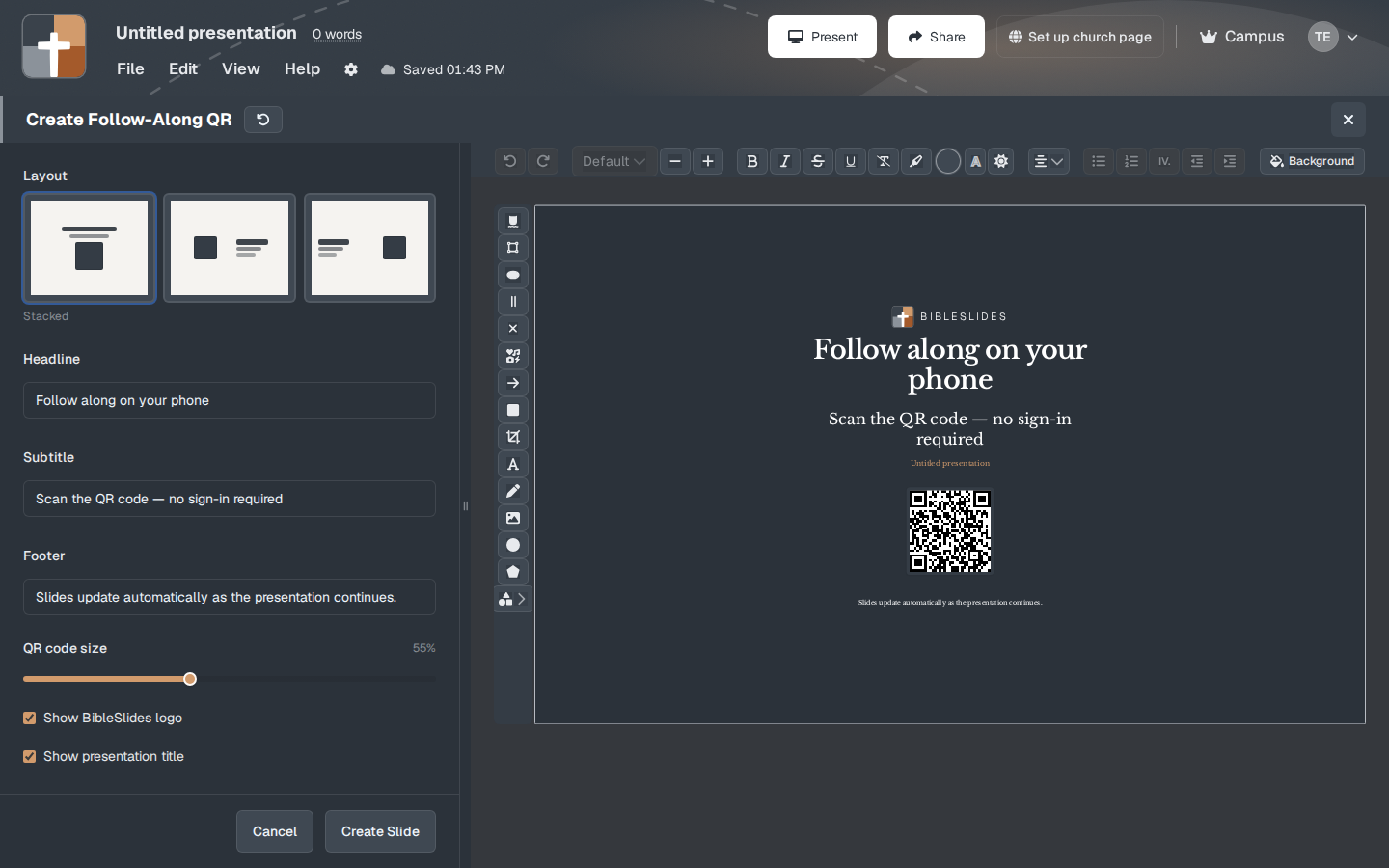
The setup window
- Layout — the sample uses Stacked: words, then the code, then a footer.
- Headline — the sample says “Follow along on your phone.” Size starts at 145%.
- Subtitle — the sample says “Scan the QR code — no sign-in required.” Size starts at 85%.
- Footer — the sample says “Slides update automatically as the presentation continues.” Size starts at 90%. The presentation title (“Untitled presentation” until you name the deck) can sit with the code.
- QR code size — the sample is 55%.
- Show BibleSlides logo
- Show presentation title
- Background, then Create Slide. When the account cannot use follow-along, the button says Upgrade to Add.
No sign-in is required for the person scanning. They do not need a BibleSlides account to follow.
While you present
Leave this slide up at the start long enough for phones to lock on, then go on with the sermon. The phones keep updating after you leave the QR slide. If you only flash the code for a second, half the room is still opening the camera.
The code is for this presentation, on the network the phones can reach. Test it from a phone that is not on the church office network.
Plans
Follow-Along QR is Campus only, plus the 30-day signup trial. The trial includes audience follow-along. Monthly and annual Premium do not include this slide after the trial ends. Campus and campus member accounts do. A crown and Upgrade to Add are what you see when it is locked.
Free’s other limits (7 slides, 3 presentations, watermark, no Bible Photos) are separate. A Campus account is not under those Free caps.