Help Center · Account & Plans
Free, Premium, and Campus
Slide limits, crowns, and what each plan includes.
Click the plan badge in the header (Free, Premium, Campus, or Trial) or choose Plans & billing in the account menu. The window is Subscription Plans. It shows Current Plan and a status such as Active.
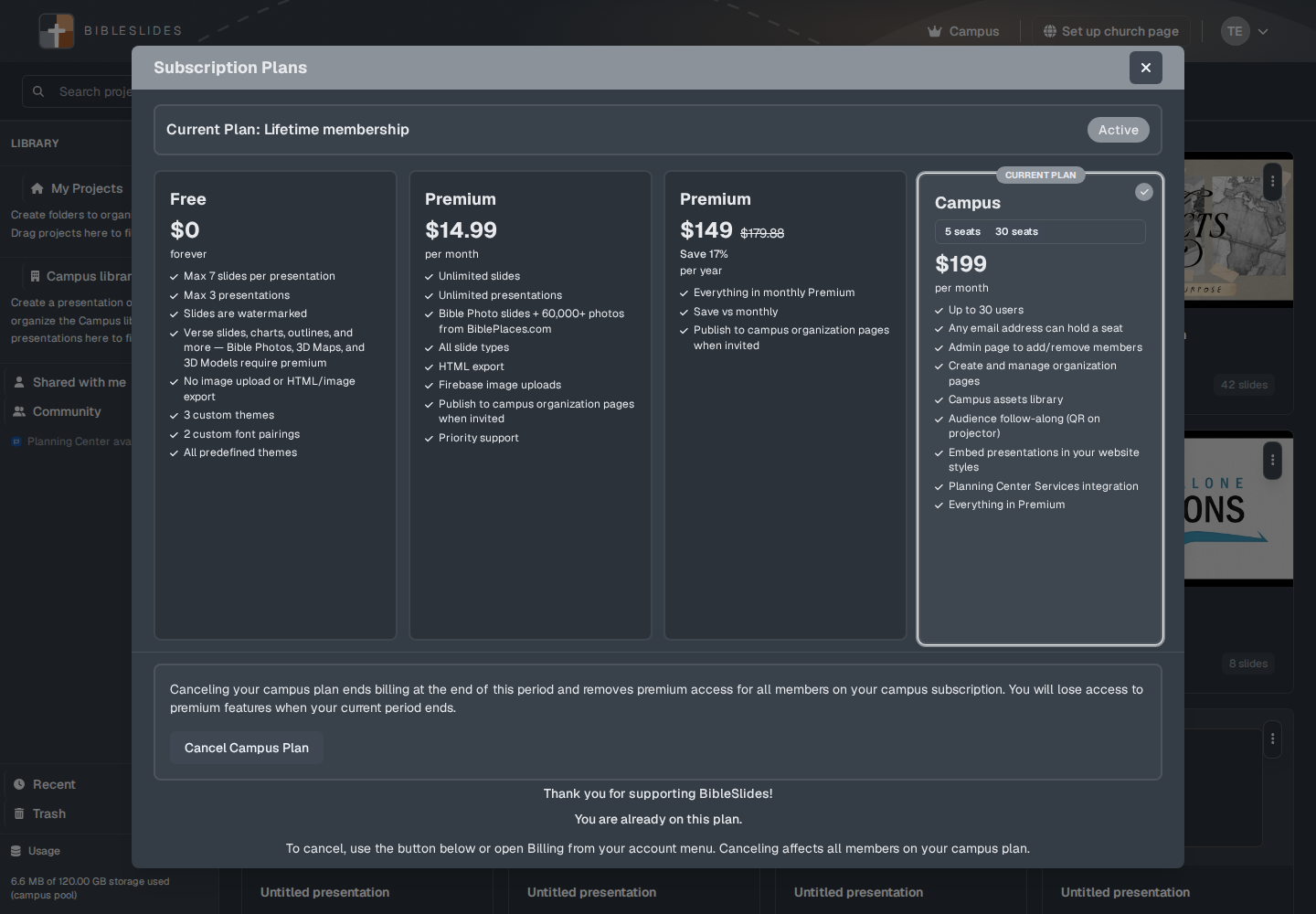
Prices below are the ones on that window. They are in US dollars.
Free
$0, forever. The card lists:
- Max 7 slides per presentation
- Max 3 presentations
- Slides are watermarked
- Verse slides, charts, outlines, and more — Bible Photos, 3D Maps, and 3D Models require premium
- No image upload or HTML/image export
- 3 custom themes
- 2 custom font pairings
- All predefined themes
The editor is stricter than that one photo line. Free cannot add these five types: Bible Photo, 3D Bible Maps, Family Tree, Ancient Units, and 3D Models. A crown sits on the row. The setup window can open. The button reads Upgrade to Add.
SnappyBible and the on-the-fly tools (Bible, Maps, Photos, Timeline, Board) are not on Free. The plans card does not spell that out. The editor does, with a crown and the upgrade window.
The sample presentation does not count toward the 3. A deck you create does.
At the slide cap, the window is Slide Limit Reached: “You've reached the limit of 7 slides on the free plan.” The button is Upgrade to Premium. At the deck cap: “You've reached the limit of 3 presentations on the free plan. Upgrade to Premium for unlimited presentations.”
Premium
$14.99 per month, or $149 per year. The annual card shows $179.88 struck through and Save 17%. The annual card says “Everything in monthly Premium” and “Save vs monthly.”
Monthly lists:
- Unlimited slides
- Unlimited presentations
- Bible Photo slides + 60,000+ photos from BiblePlaces.com
- All slide types
- HTML export
- Firebase image uploads
- Publish to campus organization pages when invited
- Priority support
Premium includes the five types Free cannot add, image upload, and export. Follow-Along QR and Planning Center are not on Premium after the trial. Publishing onto someone else’s church page is allowed when a campus admin has invited you. Creating the church page is Campus.
Campus
The card has 5 seats and 30 seats. It opened here on 30 seats at $199 per month. The 5-seat choice is $49 per month. The feature list:
- Up to 30 users (or 5, on that button)
- Any email address can hold a seat
- Admin page to add/remove members
- Create and manage organization pages
- Campus assets library
- Audience follow-along (QR on projector)
- Embed presentations in your website styles
- Planning Center Services integration
- Everything in Premium
A campus member uses the church’s plan. They do not buy a second Premium seat to edit. Campus admin in the account menu is where members and the organization page are managed.
Canceling a campus plan warns that it ends billing at the end of the period and removes premium access for every member on that subscription. The button is Cancel Campus Plan.
Crowns
A crown on a slide type, on SnappyBible, or on an on-the-fly button means this account cannot use it yet. It is not a decoration. Follow-Along QR uses the same idea for Campus (and for the trial).
Where the trial fits
New accounts get 30 days of Premium, including audience follow-along, with no card. When that ends, the Free list applies unless you upgrade. See The 30-day trial.