Help Center · Slide Types
Outline
A heading and one point per line, with a sequential reveal.
Outline is the slide most sermons start with: a heading and a list of points, one per line.
Where to find it
Pinned for new accounts. Otherwise More slide types → Outline. The window is Create Outline.
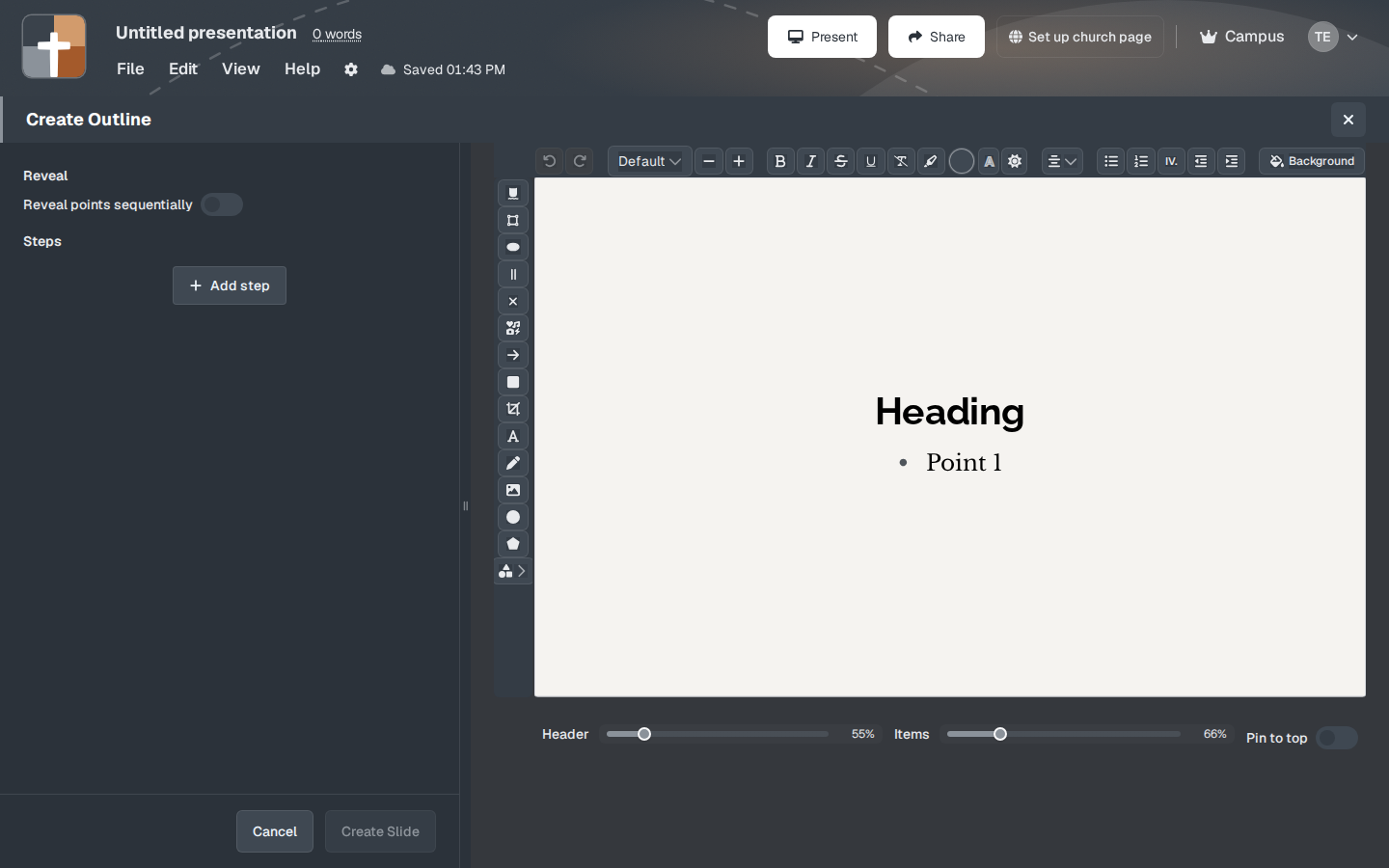
The setup window
- The preview shows Heading and Point 1 until you type your own.
- Heading is the title.
- The points box says One point per line. Press Enter for the next point.
- Reveal points sequentially makes each point a step, so the list grows as you preach.
- Steps and Add step add a mark that is not a new point: a zoom, an arrow, a label.
- Header is the title size. A new outline starts at 55%.
- Items is the point size. It starts at 66%.
- Pin to top keeps the heading on screen while later points appear.
- Background is the slide background.
- Create Slide commits it. Cancel closes the window.
A useful first outline: heading “Love your neighbor”, then three lines — who is my neighbor, the priest and the Levite, the Samaritan stopped.
While you present
With sequential reveal on, do not read points the room cannot see yet. Advance once, make the point, advance again. With it off, the whole list is visible and your notes carry the timing.
Plans
Outline is on the Free plan. Free decks stop at 7 slides and 3 presentations, and the slideshow is watermarked. The 30-day trial on a new account is Premium until it ends.